See where your time really goes
and build better habits
Calenytics turns your iPhone calendar into clear analytics: understand how you spend your time at a glance, set goals, and build routines that stick — completely privacy-first.
Everything you need
to take control of your time
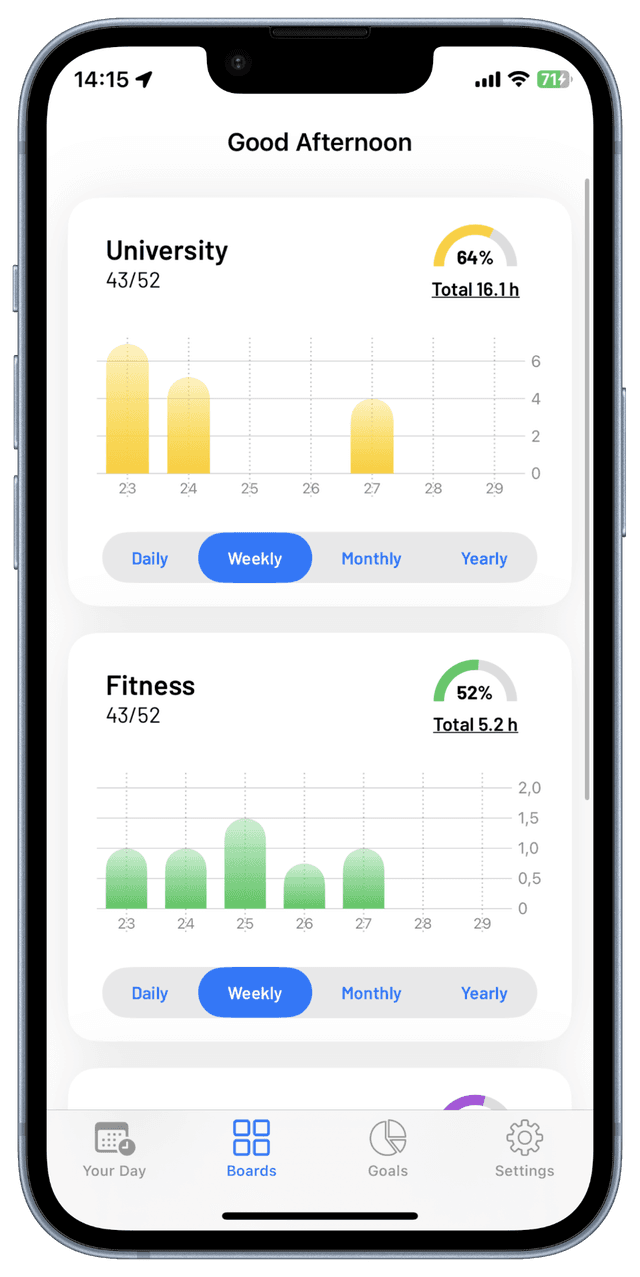
Calenytics brings powerful analytics and insights straight to your iOS calendar — helping you build better habits and reach your goals.
Native iOS Calendar Integration
Connects seamlessly with your iPhone calendar. No third-party access — your data stays on your device.
Smart Event Tracking
Automatically counts and categorizes your calendar events so you understand where your time goes.
Flexible Goals
Set daily, weekly, monthly, and yearly goals and track your progress with visual insights.
Build Habits
Turn calendar events into lasting routines and find balance between work, health, and personal time.
Progress Visualized
Clear charts show your development across weeks and months — motivation you can actually see.
Privacy First
No accounts, no tracking, no mandatory cloud. Your calendar data never leaves your iPhone.
Three steps to more clarity
From calendar to habit: Calenytics turns your events into actionable insights — with zero manual effort.
Create a Card
Select your calendars and create tracking cards for different areas of your life — work, fitness, hobbies, or anything you want to monitor.
Set Your Goals
Define daily, weekly, monthly, and yearly goals per card and challenge yourself to keep balance and consistency.
Reach Your Goals
Track your activities through the iOS calendar and watch Calenytics visualize your progress automatically.
Loved by busy people
Real schedules, clearer goals—see what users say about calendar-driven habits with Calenytics.
I finally see where my week actually goes—without adopting another app habit.
Alex M.
@alexm
Calendar goals finally feel measurable without manual time tracking.
Priya K.
@priya-k
Love that it works with the iOS Calendar I already live in.
Chris L.
@chrisl
Categories help me separate work, deep work, and family time cleanly.
Elena R.
@elena-r
Habits built from real events instead of a separate to-do app—huge win.
Sam T.
@samtx
Visuals are quick to read; great when your schedule is packed.
Jordan H.
@jordanh
I use it to spot overbooking and protect buffer time.
Noah W.
Privacy mattered to me; my calendar stays on my device where it belongs.
Mia S.
@mias
Monthly goals plus a weekly review nudged me to cut pointless meetings.
Tomás V.
@tomasv
Short onboarding—I had useful insights after the first day.
Riley B.
@rileyb
Ready to master your time?
Download Calenytics and start building better habits, achieving your goals, and finding the perfect work-life balance.